React 核心知识体系
从 JSX、组件与 ref,延伸到高阶组件、Redux 和渲染行为,形成系统复习地图。
react的特点
- 声明式 UI= f(state),只需要维护数据,UI会自动被更新
- 组件化 拆分成不同颗粒度的组件
- 跨平台 虚拟dom,编译到不同的平台】
React 版本区别
- api区别
const el= document.querySelector("root")

//18之前,
reactDOM.render(<div>hello world</div>,el)
//18 之后
const root = reactDOM.createRoot(el)
root.render(<div>hello world</div>)
类组件
- 类组件继承自React.Component,初始化时要super去调用一下父组件的构造方法
- 在构造函数中使用 this.state 对象中去定义参与UI更新的数据
- 方法绑定,this问题 类方法中的this绑定,会变成undefined
class App extends React.Component {
  constructor(){
    super()
    this.state = {
      message = "hello world"
    }
    // 方法一trick 在构造函数统一绑定this
   // this.btnClick = this.btnClick.bind(this)
  }
   // 方法一 定义类方法,然后使用的时候绑定this
   btnClick(){
   //这里的this是不一定就是当前的类,取决于其调用方式,
   //如果作为一个回调函数给别的函数调用,由于它是类方法,默认开启严格模式,this的值是undefined
   // 所以需要绑定this
    console.log(this)
   }
   // 方法二 箭头函数 默认绑定的是定义时的this,也就是当前实例,这个是类的字段
   // btnClick = ()=>{
   //  console.log(this)
   //}

   //方法三 事件监听时去定义一个箭头函数

  render(){

    return (
    <div>
      <h2>{message}</h2>

      <button onClick={this.btnClick.bind(this)}></button>
      // {/* 方法三 事件监听时去定义一个箭头函数 */}
      <button onClick={ (e)=> this.btnClick(e)}></button>
    </div>
    )
  }

}
jsx语法
- jsx基本语法
🍰 提示
jsx是js扩展语法,允许在js里面书写html代码,html in js,把UI界面的描述融合到js中 为什么react选择了jsx? UI和数据逻辑的耦合度非常高,状态和UI密不可分,所以干脆融合一起
- jsx规范
- 顶层只有一个根元素
- 外层用小括号包裹,实现内容换行,提高可读性
- 单标签使用/结尾
- jsx注释, 使用{}内多行注释的方式
 <div>
   {/*v这是注释 */}
 </div>
- jsx插入内容(标签的children,不是属性)
  <div>
   {/*基本类型字符串、数字、数组、会直接显示 出来*/}
   { }
 </div>
 <div>
   {/*undefined、null、Boolean 类型会被忽略(即使是true)*/}
   { }
 </div>
 <div>
   {/*对象类型不能作为子对象,会直接报错*/}
   { }
 </div>
// 表达式、运算符、函数调用都是合法的
- jsx的属性绑定
- 使用{}进行绑定
- 绑定class,使用关键词className
- 属性中支持绑定一个对象,如style中可以使用一个对象来实现不同的样式绑定
脚手架
组件化开发
🏝️ 提示
把大的模块拆分细化成一系列小的组件,分而治之,最终通过组合实现大的模块的功能 函数组件 (Functional Component) 类组件 (Class Component)
- 类组件
组件名称大写字母开头
类组件需要继承自React.Component
类组件必须实现render函数
constructor是可选的,如果有状态需要维护则需要定义this.state对象,使用this.setState方法更新
render函数必须实现,首次渲染以及this.state 或this.props改变时被执行,它可以返回:
React元素
返回一个数组或fragments
字符串或者数值
- 函数组件
- 函数组件没有生命周期
- this不能指向组件实例
- 内部没法保存状态
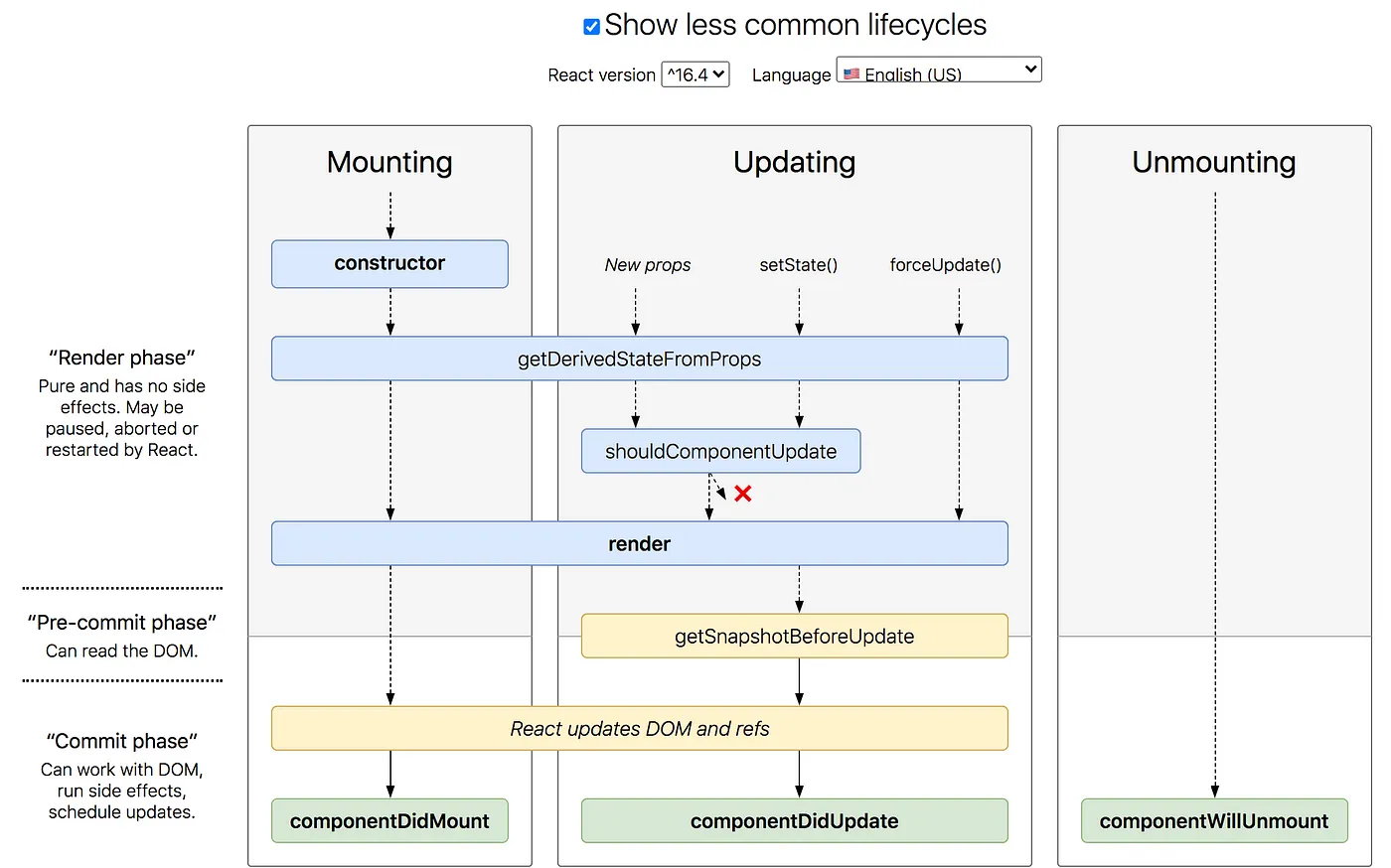
- 生命周期
- Mount componetDidMount
- Update componetDidUpdate
- Unmount componetWillUnmount
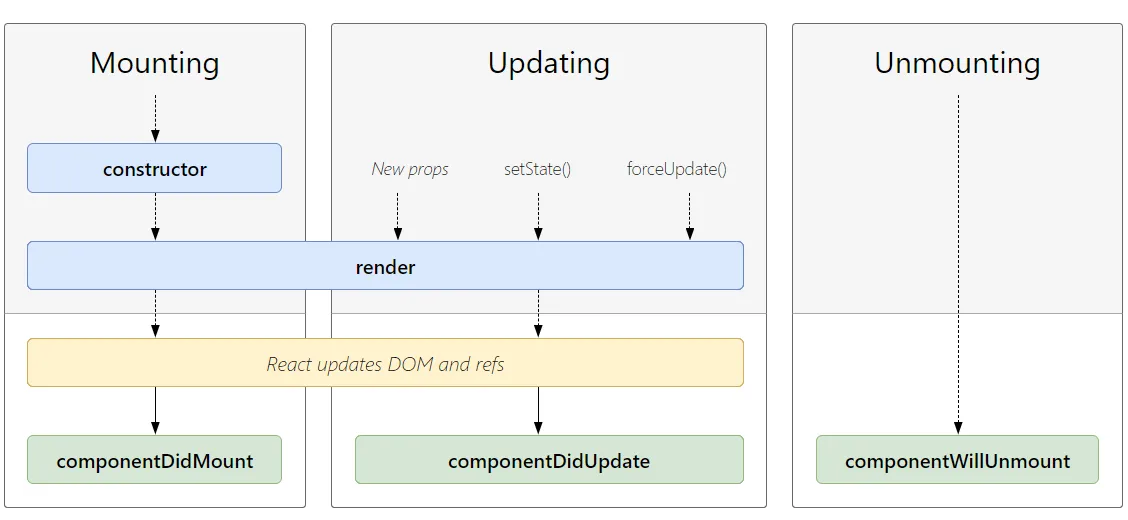
复杂版,should
- 组件间通信,实现方式多样
🎼 提示
- 直接通过属性来通信,子组件通过props来获取,父组件传递一个回调函数给子组件,子组件执行则实现了子组件给父组件传递数据
- 插槽
🍰 提示
- 通过this.props.children来获取传进去的子组件,多个时是数组,单个时就是子组件本身
- 直接通过this.props 的具体属性来传递
- 作用域插槽 --> 使用一个回调函数来作为组件,子组件使用时传入参数
- 非父子通信
🥖 提示
Context 上下文共享 Context.Consumer 可以在函数组件中使用,也可以在类组件中使用,且多个上下文需要·
- setState
🏖️ 提示
- 第一个参数可以是对象,也可以是函数,函数则会回传(state,props)两个参数,可以处理一些逻辑(如递增的情况,需要用这个state,不一定和this.state相同,取决于有没有更新完成),函数要返回一个state对象
- setState是一个异步调用,调用后不会立即执行state合并,设计成异步的原因是1. 合并多个更新再去调用render,保持state和props的一致性
- setState第二个参数是合并后的回调,确保this.state的新的数据
高级组件开发
🎉 提示
class Component使用 pureComponent,内部已经使用shallowEqual比较state和props的浅层是否相同,相同则不更新,不相同则更新 Functional Component则使用 memo去包裹
使用ref获取dom
类组件获取ref
🎉 提示
获取原生 dom 方法1. 直接使用ref属性绑定一个字符串,然后通过 this.refs获取所有绑定的ref,不推荐使用,已废弃 方法2. 使用createRef 提前创建,然后通过ref.current来获取 方法3. 回调函数,会把dom作为参数回传 类获取组件实例:可以使用方法2 函数组件,没有组件实例,通过forwardRef高阶函数来转发ref,作为第2个参数传入组件内,组件内即可通过ref属性再绑定到具体的元素上面
函数组件内部子组件获取ref
const Button = React.forwardRef(
  ({ className, variant, size, asChild = false, ...props }, ref) => {
    const Comp = asChild ? Slot : "button"
    return (
      <Comp
        className={cn(buttonVariants({ variant, size, className }))}
        ref={ref}
        {...props}
      />
    )
  }
)
高阶组件
高阶组件(higher-order component,HOC):参数为组件,返回值为新组件的函数,用来统一给组件注入一些状态
- props增强
- context共享
- 登录鉴权
- 生命周期劫持
Redux
3个核心概念
❗ 提示
- Store 存储state,和reducer
- Action 被派发出去的更新,是一个包含了action type的对象,派发到reducer函数中去处理逻辑
- Reducer 用于合并action和state,是一个纯函数,每次返回一个新的state,在函数中去处理每一个类型的action的具体逻辑 把action的类型抽取到常量中,确保reducer和action对应的type一致,实际上type也仅仅是一个标识作用
Redux flow
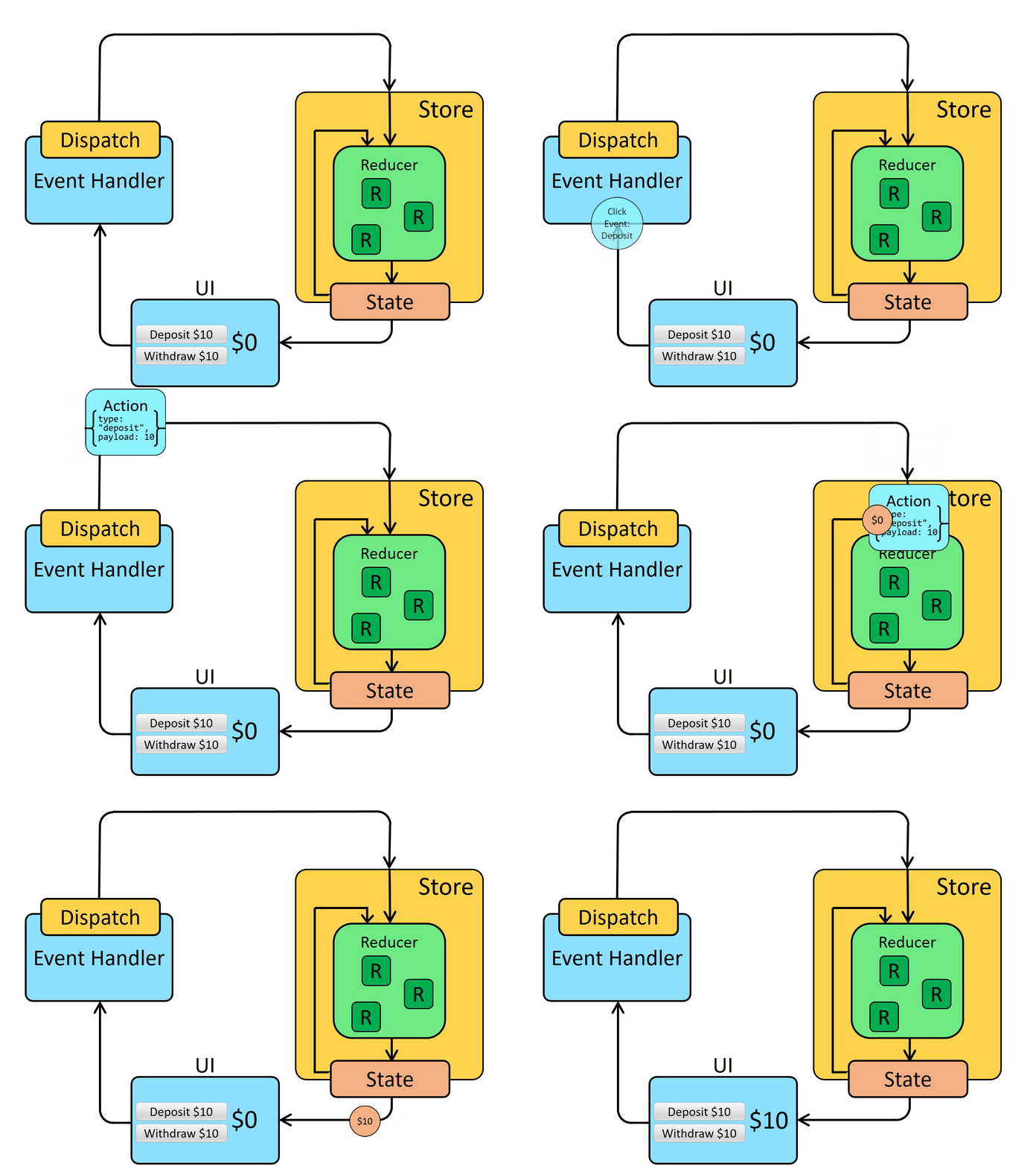
redux使用流程
//1. 创建store
// store/index.js
import { createStore } from "redux";
import reducer from "./reducer";

export const store = createStore(
    reducer
)
//2. 创建reducer
// store/reducer.js
import * as actionTypes from './constant'
const initState = {
    count: 1
}

export default reducer = (state = initState, action) => {

    switch (action.type) {
        case actionTypes.ADD_NUMBER:
            return { ...state, count: state.count + 1 }
        case actionTypes.SUB_NUMBER:
            return { ...state, count: state.count - 1 }
        default:
            return state
    }
}
// 3. 创建action函数,本质上是为了方便的创建action,直接使用对一个action对象也可以
// store/actionCreator.js
import * as actionTypes from './constant'

export const addNumberAction = (count)=>({
    type:actionTypes.ADD_NUMBER,
    count,
})
export const subNumberAction = (count)=>({
    type:actionTypes.SUB_NUMBER,
    count,
})
// 4.抽取常量
// store/constant.js
export const ADD_NUMBER = 'add_num'
export const SUB_NUMBER = 'sub_num'
//5. 业务使用
// 在组件中,派发action
import {addNumberAction } from './store/actionCreator'
import store from './store'

store.dispatch(addNumberAction(2))
react-redux
- 把react和redux结合起来,封装提供高阶组件的函数,方便使用
使用步骤:
全局提供store
// index.js
import React from 'react';
import ReactDOM from 'react-dom/client';
import './index.css';
import App from './pages/App';
import { Provider } from 'react-redux'
import store from './store'

const root = ReactDOM.createRoot(document.getElementById('root'));
root.render(
    <Provider store={store}>
        <App />
    </Provider>
);
在组件中使用,同步action
// component
// 在组件内使用,通过connect高阶函数,传递所需要的state和会触发的dispatch

//函数组件
import React from 'react'
import { connect } from 'react-redux'
import { addNumberAction, subNumberAction } from '../store/actionCreator'

export const About = (props) => {
    const { count, addCount, subCount } = props
    return (
        <div>
            <div> count: {count}</div>
            <button onClick={e => addCount(1)}>+</button>
            <button onClick={e => subCount(1)}>-</button>
        </div>
    )
}
const mapStateToProps = (state) => ({ count: state.count })
const mapDispatchToProps = (dispatch) => ({
    addCount: (num) => dispatch(addNumberAction(num)),
    subCount: (num) => dispatch(subNumberAction(num))
})
export default connect(mapStateToProps, mapDispatchToProps)(About)

// 类组件
import React, { Component } from 'react'
import { connect } from 'react-redux'
import { addNumberAction, subNumberAction } from '../store/actionCreator'
export class Home extends Component {
    render() {
        const { count, addCount, subCount } = this.props
        return (
            <div>
                <div>Home</div>
                <div> count: {count}</div>
                <button onClick={e => addCount(1)}>+</button>
                <button onClick={e => subCount(1)}>-</button>
            </div>
        )
    }
}
const mapStateToProps = (state) => ({ count: state.count })
const mapDispatchToProps = (dispatch) => ({
    addCount: (num) => dispatch(addNumberAction(num)),
    subCount: (num) => dispatch(subNumberAction(num))
})
export default connect(mapStateToProps, mapDispatchToProps)(Home)
异步action
需要使用中间件增强,redux-thunk
// 安装中间件 redux-thunk,并使用
import { createStore, applyMiddleware } from "redux";
import reducer from "./reducer";
import { thunk } from "redux-thunk";

export const store = createStore(
    reducer, applyMiddleware(thunk)
)

export default store
- 编写异步action
//这个action返回一个函数,返回的这个函数会被中间件调用,并传入两个参数,dispatch和getState
//当异步的结果获取的时候,再次dispatch真正的数据过去,这个action还是正常的可以传入参数
export const fetchDataAction = (num) => {
    //返回的这个函数会被thunk中间件调用,传递一个dispatch和getState函数进来
    return (dispatch, getState) => {
        axios.get('').then(res => {
            const data = res.data.count
            dispatch(addNumberAction(data))
        })
    }
}
- 组件中派发action
import React, { Component } from 'react'
import { connect } from 'react-redux'
import { addNumberAction, fetchDataAction, subNumberAction } from '../store/actionCreator'
export class Home extends Component {
    render() {
        const { count, addCount, subCount,fetchCount } = this.props
        return (
            <div>
                <div>Home</div>
                <div> count: {count}</div>
                <button onClick={e => addCount(1)}>+</button>
                <button onClick={e => subCount(1)}>-</button>
                <button onClick={e => fetchCount(1)}>fetchCount</button>
            </div>
        )
    }
}

const mapStateToProps = (state) => ({ count: state.count })

const mapDispatchToProps = (dispatch) => ({
    addCount: (num) => dispatch(addNumberAction(num)),
    subCount: (num) => dispatch(subNumberAction(num)),
    fetchCount: (num) => dispatch(fetchDataAction(num))
})

export default connect(mapStateToProps, mapDispatchToProps)(Home)
模块的拆分 - 多个reducer
// 在store创建的时候,使用一个combineReducers去合并不同的reducer,
// 就可以把不同的reducer和action分离出去
// 使用时也需要多家一层key去去取到对应的state
import { createStore, applyMiddleware,combineReducers } from "redux";
import homeReducer from "./reducer";
import { thunk } from "redux-thunk";

const reducer =  combineReducers({
 home:homeReducer
})

export const store = createStore(
    reducer, applyMiddleware(thunk)
)

export default createAsyncThunkstore
Rtk redux toolkit
官方推荐的编写redux逻辑的标准方式
@reduxjs/toolkit,集成了redux-thunk等中间件
使用方式
创建store
//

import homeReducer from "./reducer";
import { configureStore } from '@reduxjs/toolkit'

export const store = configureStore({
    reducer: {
        home: homeReducer
    }
})
export default store
创建分片reducer
❗ 提示
异步组件还可以从createAsyncThunk返回结果,使用extraReducer的方式来 实现dispatch的派发,但是代码会繁琐一些
import { createAsyncThunk, createSlice } from '@reduxjs/toolkit'

const initState = {
    count: 1
}

const countSlice = createSlice({
    name: 'home',
    initialState: initState,
    reducers: {
    //同步actions
        addNumber(state, { payload }) {
            state.count += payload
        },
        subNumber(state, { payload }) {
            state.count -= payload
        }
    }
})

//异步action
export const fetchData = createAsyncThunk('fetchData', async (params, store) => {
    const res = await new Promise(resolve => {
        resolve({
            data: {
                count: 3
            }
        })
    })
    store.dispatch(addNumber(res.data.count))
})
//导出reducer
export default countSlice.reducer
//导出同步action
export const { addNumber, subNumber } = countSlice.actions
组件内使用
import React, { Component } from 'react'
import { connect } from 'react-redux'
import { addNumber, fetchData, subNumber } from '../store/reducer'
export class Home extends Component {
    render() {
        const { count, addCount, subCount, fetchCount } = this.props
        return (
            <div>
                <div>Home</div>
                <div> count: {count}</div>
                <button onClick={e => addCount(1)}>+</button>
                <button onClick={e => subCount(1)}>-</button>
                <button onClick={e => fetchCount(1)}>fetchCount</button>
            </div>
        )
    }
}

const mapStateToProps = (state) => ({ count: state.home.count })
const mapDispatchToProps = (dispatch) => ({
    addCount: (num) => dispatch(addNumber(num)),
    subCount: (num) => dispatch(subNumber(num)),
    fetchCount: (num) => dispatch(fetchData(num))
})

export default connect(mapStateToProps, mapDispatchToProps)(Home)
数据不可变原理
底层使用了immerjs,实现创建一个新的对象,但是不变的部分,仍然引用原来不改变的属性,实现复用和,减少内存浪费
实现自定义的connect
connect本身是一个高阶函数,返回一个高阶组件
//connect.js

import React, { PureComponent } from 'react'
import { storeContext } from './provider'

// 一个高阶函数,返回一个高阶组件
export function connect(mapStateToProps, mapActionsToProps) {
    return (WrapComponent) => {

        class NewComponent extends PureComponent {
            constructor(props, context) {
                super(props)
                this.state = mapStateToProps(context.getState())

            }
            componentDidMount() {
                this.unSubsribe = this.context.subscribe(() => {
                    this.setState(mapStateToProps(this.context.getState()))
                })
            }
            componentWillUnmount() {
                this.unSubsribe()
            }

            render() {
                const actions = mapActionsToProps(this.context.dispatch)
                const state = mapStateToProps(this.context.getState())
                return (
                    <WrapComponent {...this.props} {...state}{...actions} />
                )
            }
        }
        NewComponent.contextType = storeContext
        return NewComponent
    }
}
创建一个上下文用来共享整个store
import { createContext } from 'react'

export const storeContext = createContext()
export const Provider = storeContext.Provider
Router
router的使用
app整体包裹一个HashRouter或者BrowserRouter组件
// index.js
import React from 'react';
import ReactDOM from 'react-dom/client';
import './index.css';
import App from './pages/App';
import { Provider } from 'react-redux'
import store from './store'
import { storeContext } from './myConnect'
import { HashRouter } from 'react-router-dom'

const root = ReactDOM.createRoot(document.getElementById('root'));
root.render(
    <Provider store={store}>
        <storeContext.Provider value={store}>
            <HashRouter>
                <App />
            </HashRouter>
        </storeContext.Provider>
    </Provider>
);
组件使用
import React, { PureComponent } from 'react'
import About from './about'
import Home from './Home'
import { Routes, Route, Navigate } from 'react-router-dom'

export class App extends PureComponent {
  render() {
    return (
      <div >
        <h1>Hello CodeSandbox</h1>
        <Routes>
          <Route path="/" element={<Navigate to="/home" />}></Route>
          <Route path="/about" element={<About />}>

          </Route>
          <Route path='/home' element={<Home />}></Route>
          <Route path='*' element={<Home />}></Route>
        </Routes>
      </div>
    )
  }
}

export default App
嵌套使用
使用组件
// app组件中
import React, { PureComponent } from 'react'
import About from './about'
import Home from './Home'
import AboutMe from './aboutMe'
import AboutContact from './aboutContact'
import AboutHiring from './aboutHiring'
import { Routes, Route, Navigate } from 'react-router-dom'

export class App extends PureComponent {
  render() {
    return (
      <div >
        <h1>Hello CodeSandbox</h1>
        <Routes>
          <Route path="/" element={<Navigate to="/home" />}></Route>
          <Route path="/about" element={<About />}>
            <Route path="/about" element={<Navigate to="/about/me" />}></Route>
            <Route path='/about/me' element={<AboutMe />}></Route>
            <Route path='/about/hiring' element={<AboutHiring />}></Route>
            <Route path='/about/contact' element={<AboutContact />}></Route>
          </Route>
          <Route path='/home' element={<Home />}></Route>
          <Route path='*' element={<Home />}></Route>
        </Routes>
      </div>
    )
  }
}

export default App
二级页面占位
about组件中需要使用outlet组件占位
import { connect } from '../myConnect'
import { addNumber, subNumber } from '../store/reducer'
import React, { PureComponent } from 'react'
import { Outlet } from 'react-router-dom'

export class About extends PureComponent {
    render() {
        const { count, addCount, subCount } = this.props
        return (
            <div>
                <div>About</div>
                <div> count: {count}</div>
                <button onClick={e => addCount(1)}>+</button>
                <button onClick={e => subCount(1)}>-</button>
                <br />
                <Outlet></Outlet>
            </div>
        )
    }
}
抽取配置形式
配置文件
import Home from '../pages/Home'
import AboutMe from '../pages/aboutMe'
import AboutContact from '../pages/aboutContact'
import AboutHiring from '../pages/aboutHiring'
import { Navigate } from 'react-router-dom'
import React from 'react'

const About = React.lazy(() => import('../pages/about'))

export const routes = [
    {
        path: '/',
        element: <Navigate to="/home" />
    },
    {
        path: '/home',
        element: <Home />
    },
    {
        path: '/about',
        element: <About />,
        children: [
            {
                path: '/about',
                element: <Navigate to="/about/me" />
            },
            {
                path: '/about/me:id',
                element: <AboutMe />
            },
            {
                path: '/about/hiring',
                element: <AboutHiring />
            },
            {
                path: '/about/contact',
                element: <AboutContact />
            }
        ]

    },
    {
        path: '*',
        element: <Home />
    }
]
应用
import React from 'react'
import { routes } from '../router'
import { useRoutes } from 'react-router-dom'

export function App() {
  return (
    <div >
      <h1>Hello CodeSandbox</h1>
      {useRoutes(routes)}
    </div>
  )

}

export default App
Suspense
import React, { Suspense } from 'react';
import ReactDOM from 'react-dom/client';
import './index.css';
import App from './pages/App';
import { Provider } from 'react-redux'
import store from './store'
import { storeContext } from './myConnect'
import { HashRouter } from 'react-router-dom'

const root = ReactDOM.createRoot(document.getElementById('root'));
root.render(
    <Provider store={store}>
        <storeContext.Provider value={store}>
            <Suspense fallback={<h3>loading....</h3>}>
                <HashRouter>
                    <App />
                </HashRouter>
            </Suspense>
        </storeContext.Provider>
    </Provider>
);
传参
Path
path: '/about/me:id'
query
hooks
⚽ 提示
为什么需要hooks?
- 原来函数组件不行:因为原本的函数组件,每次渲染时,函数都会重新执行(相当于render函数),所以函数内无法保存自己的状态数据,所以需要hooks来实现函数内保存状态。而原本的class component渲染只需要render函数重新执行,所以可以保存状态,同时函数组件也没有生命周期,所以需要hooks来进行补充
- 类组件不行:类组件逻辑复杂,不好理解,this指向不明,成为学习的障碍,组件状态复用困难
❗ 提示
注意事项:
- 只能在函数组件/自定义hook调用hook
- 只能在函数最外层调用hook,不能在函数内块代码(if、for、循环)调用
useState
- 参数-- 初始化值 ,默认为undefined
- 返回值 -- 数组,元素1,当前状态值,元素2 设置状态的函数
import { useState } from 'react'

function Counter(props){
  const [ count,setCount ] = useState(0) // 参数-初始化值 ,默认为undefined
  // 返回值 -- 数组,元素1,当前状态值,元素2 设置状态的函数
}
useEffect
主要用于副作用代码,默认情况下会在每次组件渲染完成会自动回调,如操作dom/网络请求/事件监听
也就是不会阻塞渲染,内容显示后才会执行这个回调
- 参数 Setup: ()=>cleanUp|undefined,dependence
import { useEffect } from 'react'

function Counter(props){
   useEffect(()=>{
   // 副作用操作,默认情况下会在渲染完成时执行
   // 返回一个清理函数 模拟componentWillUnmount 生命周期
   },[])
   // 第二个参数是依赖项数组,只有依赖赖项发生改变时重新执行
   // 空数组表示仅执行一次 模拟componentDidMount
   // 不传表示每次渲染都执行 模拟 componetDidUpdate
}
一个函数组件可以有多个useEffect,按照顺序执行,并可以抽取成自定义hook,按照用途组织代码
❗ 提示
- 渲染时先执行setup,然后存储cleanUp
- 卸载时执行cleaUp
- dependence依赖数组可以控制更新的触发 模拟生命周期: componentWillUnmount: 返回的清理函数 componentDidMount: dependence 空数组,第一次渲染运行 componetDidUpdate: dependence不传参数,每次运行
useContext
用于获取祖先组件注入的上下文
创建上下文
import { createContext } from 'react'

export const userContext = createContext()
注入上下文
import { userContext } from './context'
import React, { Suspense } from 'react';
import ReactDOM from 'react-dom/client';
import './index.css';
import App from './pages/App';
import { Provider } from 'react-redux'
import store from './store'
import { HashRouter } from 'react-router-dom'

const root = ReactDOM.createRoot(document.getElementById('root'));
root.render(
        <userContext.Provider value={{name:'test'}}>
            <Suspense fallback={<h3>loading....</h3>}>
                <HashRouter>
                    <App />
                </HashRouter>
            </Suspense>
        </userContext.Provider>
);
使用useContext获取上下文内容
import React, { memo, useContext } from 'react'
import { userContext } from '../context'

const Hooks = memo(() => {
    const user= useContext(userContext)
    return (
        <div>
            <div>Hooks</div>
            <div>{user.name}</div>
        </div>
    )
})

export default Hooks
❗ 提示
- 获取到的上下文需在祖先组件中进行注入
- 上下文发生变化,使用的组件会触发重新渲染
- 注入的组件和使用的组件中间的组件,使用了memo来包裹优化情况下,不会触发重新渲染,也不会影响上下文的传递
useCallback
参数1: fn
参数1: depandences
❗ 提示
useCallback并不能节省函数定义时的性能开销,也就是说每次函数组件重新渲染的时候,重新执行useCallback,虽然返回的是同一个函数,但是作为参数传递的函数,仍然每次都是重新定义了的,这里的性能没有优化, 优化的地方是,对于使用了useCallback返回函数作为props的子组件,不会每次都触发重新渲染(因为函数是相同的) useCallback在两种情况下是有优化的:
- 把一个函数fn传递给memo包裹的子组件,在子组件中使用fn,这时可以避免子组件每次都渲染
- 在别的hook中使用了fn,fn作为一个依赖项 总结来说: 当一个函数fn,作为另一个地方的依赖项时,为了避免另一个地方每次都被重新渲染,就要使用useCallback缓存该函数fn 如果每个函数都使用useCallback,会导致处理hook的逻辑变多,属于反向优化
使用
import React, { memo, useCallback, useState } from 'react'

const SubmitBtn = memo((props) => {
    const { handleSubmit } = props
    return (
        <div onClick={handleSubmit}>+1</div>
    )
})
const Hooks = memo(() => {
    const [count,setCount ] = useState()
    const handleSubmit = useCallback(() => {
        console.log('handleSubmit')
        setCount(count+1)
    }, [count])
    return (
        <div>
            <div>Hooks</div>
            <SubmitBtn handleSubmit={handleSubmit}></SubmitBtn>
        </div>
    )
})

export default Hooks
使用ref 进一步优化
useRef返回一个固定的对象,但是其current值可被每次更新,这样可以在回调函数中每次获取最新的值,避免闭包陷阱以及生成新的函数,就不会不会每次更新子组件
import React, { memo, useCallback, useContext, useRef, useState } from 'react'

const SubmitBtn = memo((props) => {
    const { handleSubmit } = props
    return (
        <div onClick={handleSubmit}>+1</div>
    )
})

const Hooks = memo(() => {
    const [count, setCount] = useState()
    const countRef = useRef()
    countRef.current = count
    const handleSubmit = useCallback(() => {
        setCount(countRef.current + 1)
    }, [])
    return (
        <div>
            <div>Hooks</div>
            <SubmitBtn handleSubmit={handleSubmit}></SubmitBtn>
        </div>
    )
})

export default Hooks
❗ 提示
这里要注意【闭包陷阱】 如果没有传入依赖参数【上面代码中的 [count] 】 当传入的fn,依赖了某个外部变量时(上面代码中的count),由于useCallback的缓存作用,每次返回的都是第一次运行时传入的函数,也就是说,count取到的值也是第一次运行的值 (形成了闭包时,取到的count就是固定的) 如有传入依赖,依赖改变时,useCallback会返回一个新的函数,也就以当前的count值,生成一个新的闭包
useMemo
const  value =  useMemo(fn, dependencies)
// value 是 fn的执行结果,dependencies不变时,缓存fn的执行结果,
可以使用useMemo实现useCallback
const useCallback = (fn, dependencies) => {
  return useMemo(() => fn, dependencies)
}
❗ 提示
useMemo优化的点:
- 避免fn每次渲染都被重新执行,优化的是本组件fn执行的开销 -- 主要用途
- 当需要传递对象类型的数据给子组件时,避免每次重新渲染定义新的对象导致子组件被重新渲染,这个和useState重复了
useRef
组件的生命周期中,对象是的内存地址不变,主要用途是用来获取dom
import React, { memo, useRef} from 'react'

const Hooks = memo(() => {
    const countRef = useRef()
    return (
       <div>
           <div ref={countRef}>Hooks</div>
       </div>
    )
})

export default Hooks
useLayoutEffect
在内容更新到屏幕上前执行,会阻塞渲染。比useEffect执行时机更前一点
自定义hook
多个组件相同的的逻辑,可以单独抽取出来,实现代码复用
useSelector 和 useDispatch
redux中的hook
useDispatch获取redux中的store的dispatch函数,仅此而已
useSelector的回调函数相当于原来connect高阶函数的 mapStateToProps
useSelector有2个参数,第一个参数是mapStateToProps,第二个参数是新旧state的比较方法,决定是否更新
import React, { memo } from 'react'
import { useDispatch, useSelector,shallowEqual } from 'react-redux'
import { addNumber } from '../store/reducer'

const Hooks = memo(() => {
    const { count } = useSelector((state) => ({ count: state.home.count }),shallowEqual)
    const dispatch = useDispatch()
    function addCount(num) {
        dispatch(addNumber(num))
    }
    return (
        <div>
            <div> count: {count}</div>
            <button onClick={e => addCount(1)}>+</button>
        </div>
    )
})

export default Hooks
❗ 提示
性能优化 默认情况下不传入第2个参数,会导致useSelector监听整个store的变化 这个时候传入第二个参数,可以浅层比较前后两个state是否变化,从而决定是否更新当前的组件
useTransition
可以降低某些操作的优先级
const [pending,startTransition] = useTransition()
   startTransition(()=>{

   })
pending,表示回调函数是否在执行,startTransition里的回调函数是否已经执行完成
startTransition的回调函数会被降低优先级,在其他更新完成后才去调用,避免一些耗时操作去影响界面渲染的更新